
Become a premium member to remove ads

haloman30
-
Posts
3,169 -
Joined
-
Last visited
-
Days Won
187
Content Type
Profiles
Forums
Events
Downloads
Helpcenter
1.13 Update Progress
Chaotic United Feature Plan
Bug Tracker
Suggestions Tracker
Plugin Documentation
Wiki
Staff Applications
Blogs
Store
Gallery
Stratagem
Everything posted by haloman30
-
Obtaining Currently, Raw Blazerium can only be obtained using commands. In order to be useful, it must be purified by smelting it in a furnace. Usage Smelting Blazerium raw_blazerium blazerium false false History Main MC Server MC 1.16.1 Added Packed Blaze Powder MC 1.18.1 Raw Blazerium is now handled via CUCraftingPlus plugin Changed display name from 'Packed Blaze Powder' to 'Raw Blazerium'
-
Obtaining Blazerium can only be obtained by smelting Blazerium Dust, which can only be obtained using commands. When smelted, Blazerium can be used to create several possible items. Usage Crafting Blazerium Sword ;blazerium; ;blazerium; ;stick; blazerium_sword false false false Blazerium Hammer blazerium;blazerium;blazerium blazerium;stick;blazerium ;stick; blazerium_hammer false false false Smelting Blazerium raw_blazerium blazerium false false Lore Blazerium is the polar opposite of Frostone - a condensed and self-contained source of pure heat. It seems like this item should be well-suited for heating things in all sorts of ways... History Main MC Server MC 1.16.1 Added Fire Gem Changed name to Blazerium Gem MC 1.18.1 Blazerium is now handled by CUCraftingPlus plugin Changed display name from 'Blazerium Gem' to 'Blazerium' Changed vanilla material from Orange Dye to Paper
-
Classic GUI Technique The traditional technique for creating custom GUIs that can be found almost univerally across many plugins, both public and private, is to blank out unused slots with Black Stained Glass Panes or to simply leave them blank. Various items are used for buttons and interactive elements. This technique remains the only technique used in most of the gamemodes within Chaotic United outside of Survival. Slot Mask Technique An early attempt to raise the bar for custom GUIs was to leverage a series of 'Slot Mask' items. Most commonly used was the GUI Slot Mask item, which is used to block out an entire inventory slot. Several additional items were also created to act as buttons and other GUI elements, which are listed below. While this technique has largely been succeeded by the GUI Overlay Technique, it is still used on rare occasion for specific use cases. Generic Buttons Back Next Cancel Confirm Refresh Generic Icons Arrow Left Subtract Add Pointer CUMarketplace Add Buttons CUMarketplace Subtract Buttons CUMarketplace Miscellaneous Buttons Browse Listings Browse Listings (Alternate) Add New Listing My Listings Price Hover Button (Unused) Set Custom Listing Price CUMarketplace Preset Price Buttons Generic Icons (Unused) Arrow Left (18px) Pointer (Alternate) GUI Overlay Technique The most advanced GUI technique is the GUI Overlay Technique. This is used exclusively in Survival, as it relies on the use of the server resource pack in order for GUIs to display properly. This approach relies on overriding the textures of specific text characters in the in-game font with various "alignment helpers", as well as the actual textures of GUIs themselves. These characters are strategically placed within the title of a container, and can result in GUIs of a significantly higher quality than would usually be expected from a container-based GUI, despite being technically identical under the hood. Some examples of this technique can be found with the Upgrade Station GUI along with Crafting and Furnace recipe previews in the Recipe Guide (accessible by using /recipes ingame).
-
Obtaining The CUItemSpawn Inspector can only be obtained using commands. Additionally, it can only be obtained and used by certain staff members. Users without the appropriate permissions will be unable to use the item, even if they obtain it. Usage To use the inspector, right-click on a block while holding the inspector. With the appropriate permissions, information about the clicked block will be displayed in chat. History Main MC Server MC 1.16.2 Added the CUItemSpawn Inspector as part of CUItemSpawn Added a custom texture for the CUItemSpawn Inspector MC 1.18.2 With the introduction of CUCraftingPlus and the migration away from Optifine CIT-based items, the texture was incidentally changed back to
-
Background Currently, the CUGates Wand cannot be obtained. It could previously be obtained using the /cugates wand command, however since CUGates 2.0 was never completed (and was later removed), it was made inaccessible without manually assigning the appropriate lore to an item. With the update to MC 1.18.1 and the introduction of CUCraftingPlus, the CUGates Wand was never assigned any data values or item model, and as such, it was made unobtainable. Variants The item has 3 different appearance states, which would be used depending on the actions performed. Initial Position 1 Selected Position 2 Selected History Main MC Server MC 1.16 Added CUGates Wand textures MC 1.18.1 CUGates Wand is no longer accessible, as Optifine CIT-based items are no longer supported, and the item was not made available through CUCraftingPlus Trivia The blue and orange colors for the CUGates Wand states were inspired by the Portal Gun colors from Portal/Portal 2
-
Obtaining The GUI Slot Borders can no longer be obtained, and they have no reserved data values in CUCraftingPlus. They have been entirely replaced by both the GUI Slot Mask items and the GUI Overlay textures. Variants Bottom Bottom Left Bottom Left + Bottom Right Bottom Right Left Left + Right Right Top Top Left Top Left + Top Right Top Right Slot Arrow History Main MC Server MC 1.16.1 Added GUI Slot Border textures MC 1.18.1 GUI Slot Border items are no longer obtainable, as Optifine CIT-based items are no longer supported The textures for the GUI Slot Border items remain present within the server resource pack, however no item models are assigned to them
-
Obtaining Currently, the GUI Slot Mask can only be obtained using commands. Usage The GUI Slot Mask item is primarily used as an administrative utility to create simple GUI screens. Since all custom GUIs are powered using containers, these items were planned to be used as a way to block out unused slots. Traditionally, this is done either by leaving those slots blank, or by using an item such as Black Stained Glass Panes to indicate that the slots are unused. The texture for the GUI Slot Mask is slightly darker than the default inventory container, in order to counteract the unavoidable lighting that is applied to all items within an inventory - ensuring it matches the standard inventory background color perfectly. While this item can be seen in certain cases, it has largely been replaced with new GUI overlay textures. For more information, see the GUI Techniques page. History Main MC Server MC 1.16.1 Added the GUI Slot Mask
-
Obtaining Currently, the Hydra Staff cannot be obtained. The only current evidence of its existence are its texture and its reserved data values in CUCraftingPlus. History Main MC Server MC 1.16.1 Added texture for Hydra Staff MC 1.18.1 Reserved Hydra Staff data values in CUCraftingPlus Trivia The name of the Hydra Staff was inspired by KrazyHydra, a former staff member of the old Chaotic United.
-
Obtaining Currently, the Thermometer cannot be obtained, even with commands. There is currently no texture or model for it present. The only evidence of the item is the reserved data value within CUCraftingPlus. History Main MC Server MC 1.16.1 Data values for Thermometer are now reserved in CUCraftingPlus
-
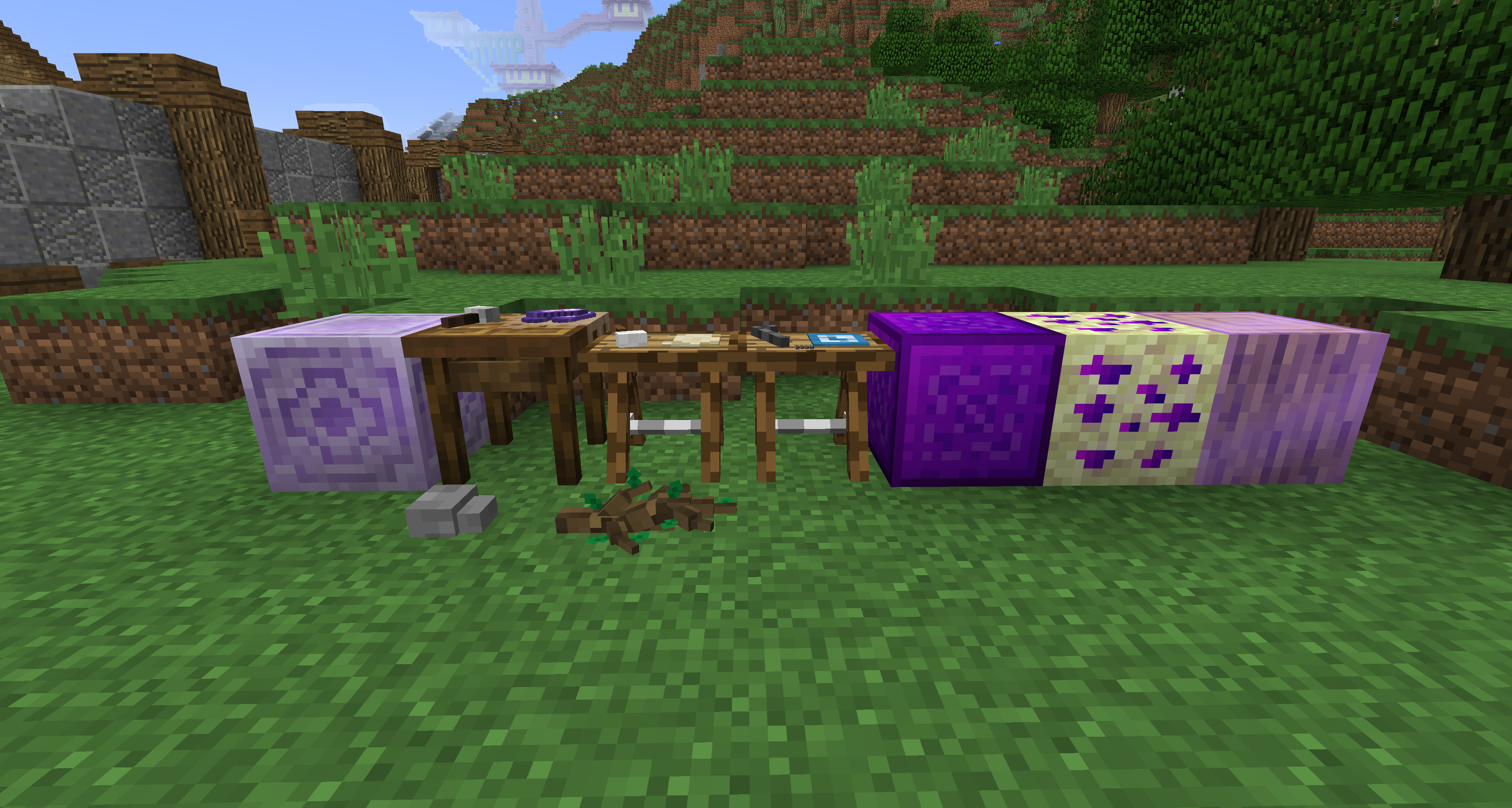 Item Frame Technique The Item Frame Technique was the first custom block technique made with the plugin. At the time, it was believed to be the only viable approach for implementing custom blocks. The way this technique works is by using an Item Frame, in conjunction with a custom item. Since resource packs allow for a custom item model have to a custom position when placed in an item frame, these models could be positioned and lined up in such a way that it resembles a standard Minecraft block. For blocks that need to be solid and have proper collision, it is possible to place these item frames within a Barrier block - where the Barrier provides the required collision for the block, further adding to the illusion of having a custom block. If a block should be non-solid, it can simply not have any block placed on top - allowing the player to walk over or through it easily. While this technique has largely been overshadowed by the Note Block Technique, it is still possible within the plugin. It is primarily still useful in some of the following situations: A custom block has a fully custom model which is partially transparent and/or exposes part of the adjacent blocks (such as the Upgrade Station) A custom block needs to be non-solid, such as the decorative Ground Rock or Ground Branch blocks Limitations While still used for specific use cases, this technique has several limitations which make it undesirable in the case of standard blocks: Lack of Ambient Occlusion, or 'Fancy' Lighting Most immediately obvious is that these blocks do not render quite the same as a standard block - almost appearing as though they're being rendered with Fast lighting, which was the lighting engine used in earlier versions of Minecraft. This would be particularly noticeable when several blocks are placed side-by-side across different light levels. Lack of Block Breaking Animations Another quickly noticeable issue is that, unlike most blocks, there are no visible cracks or any sort of animation while breaking one of these blocks - not even any particles are displayed while breaking. Reduced Render Distance and Culling The last primary issue relates to how these types of blocks are drawn - or more accurately, how they aren't. Because Item Frames are actually entities, they will relatively quickly become hidden from the player if they move too far away. As such, if a structure was made primarily or entirely out of custom blocks using this technique, the building might not be visible from a distance - even if the same terrain that the building sits on can be seen. The other related issue is culling, where if you look away from the Item Frame, it is no longer displayed to the player. In normal use, this is fine - since normally, all items within an Item Frame don't take up a full block's worth of space. However, when relying on Item Frames to display something with the size of a full block, it is possible for the Item Frame to stop being rendered, even when the block that it represents should still be visible. This can cause issues where any custom blocks at the very edges of a player's screen are simply not displayed. Limited Singleplayer Support Because of the fact that these types of blocks can often rely on an Item Frame being placed inside of a Barrier block (or in some cases, item frames which are floating and not attached to any block), as soon as any publicly released world downloads are opened in single player, or are even run in a server without the use of the CUCraftingPlus plugin (or at least with item frame ticking disabled), the majority of these types of blocks will simply break on their own a few seconds after the world is loaded. The only workaround for this is to load the world on a server with item frame ticking disabled. Doing so will ensure that any item frames that are in "invalid" locations (such as having a block placed on top of them or not being attached to a block) will remain in the world and will not break. Note Block Technique The Note Block Technique is the second possible, and has become the primary approach for most custom blocks, is the Note Block Technique. This approach relies on overriding the textures of the Note Block, based on its instrument and note. Since resource packs allow models to be overridden in this manner, it is possible for the server itself to handle the placement of these custom blocks, and place them in the world as Note Blocks - then manually specifying the block's instrument and note directly. This, combined with several other key considerations, allows for a type of custom block which is almost seamlessly integrated, with the only surefire way to reveal the block's true identity to be using the various debug utilities built into Minecraft itself. Technical Challenges Implementing custom blocks in this manner requires a great deal of technical considerations in order to pull off the illusion of custom blocks. Note Blocks First and foremost, Note Blocks themselves have to effectively be disabled - no interaction with the block in the form of playing or changing the note can be allowed during gameplay, be it with redstone or otherwise - otherwise, any custom block could start playing notes when interacted with, or worse, blocks could be transformed into other, more rare blocks, simply by changing the note. The issue with this is that, without doing additional work, Note Blocks would effectively be removed from the game. In the case of CUCraftingPlus, Note Blocks are reimplemented as a custom block themselves - allowing them to continue to be used for most typical use cases. Commercially available plugins that offer similar functionality as CUCraftingPlus typically do not do this - and simply leave Note Blocks behind. Block Breaking Animations Additionally, Note Blocks are made of wood and have their own hardness values, which poses a challenge if blocks of different materials (such as stone, dirt, or otherwise), or if blocks with different hardness values are desired. In order to achieve this, the server must first apply Mining Fatigue of -1 to the player - which keeps the animations for digging a block intact at the proper speed compared to other values, but reduces digging speed significantly enough to effectively prevent the block from ever being broken this way. Then, the plugin itself must, through a combination of its own animation tracking and usage of packets, fake the block breaking animation to simulate what the player would generally expect. This is possible thanks to the fact that other player's block breaking animations are visible on servers - as its these packets which are sent to the client during a break animation. Once the animation is complete, the block is set to Air, particles are displayed, and the appropriate item is dropped. Essentially, the CUCraftingPlus plugin has to take control of the entire process of breaking custom blocks - disabling/hiding the vanilla animations for breaking blocks, and then using its own code to simulate these same animations, adjusted for different hardness values, while also accounting for certain enchantments and status effects. Block Sounds Alongside the other challenges, Note Blocks themselves have their own block sounds - those being the standard wooden block sounds. However, in most cases, custom blocks may want to use different sounds - or even provide their own. In order to achieve this, the resource pack must first mute all wooden block sounds. This includes break sounds, placement sounds, footsteps, and others. Once this is done, the CUCraftingPlus plugin can then play sounds when appropriate - either during the block break animations, or during footsteps. One issue, however, is that without additional work done to the plugin, all wooden blocks would no longer play any sounds whatsoever - and custom blocks wouldn't be able to use them, either. The solution that CUCraftingPlus uses is to reference the wooden block sounds, but with a different sound name - allowing the plugin to play these sounds itself, not just for custom wooden blocks, but for all other vanilla wooden blocks. Since the wooden block sounds are under a different sound name, this also prevents wood sounds from being played twice in the case that a player is using an outdated version of the server resource pack, or is opting to not use it at all. Limitations Despite overcoming several major technical challenges, several limitations still apply to these types of custom blocks. Limited Singleplayer Support While this technique works better offline than the Item Frame Technique, any custom blocks will behave as Note Blocks when the CUCraftingPlus plugin is absent. Interacting with them (or even the blocks adjacent to them) will result in the custom blocks being transformed into another Note Block variant. As long as they are not disturbed (either by players or redstone), however, they will remain intact when loaded in a server without CUCraftingPlus or when loaded in single player. No Transparent Blocks Because Note Blocks are always solid blocks, it is not currently possible to use this technique for transparent blocks. It is possible that either a new discovery or future changes to how resource packs behave could change this, however this is not currently known to be possible. Removal of Mining Fatigue Because of how the plugin uses Mining Fatigue and relies on it for breaking custom blocks, it effectively requires that it be removed from the game. Allowing Mining Fatigue effects with positive values would fundamentally break the custom block break animation process and could cause any number of possible issues. Poor Note Block Performance (Theoretical) Because Note Blocks are now controlled by CUCraftingPlus entirely, it is probable that they do not perform nearly as well as a standard Note Block. This has not yet been tested thoroughly, however, so it is currently only a theoretical limitation.
 -
Obtaining A Chicken Nugget could be obtained by placing a single Cooked Chicken into a Crafting Table, giving the player 9 Chicken Nuggets. Additionally, if a player collected 9 Chicken Nuggets, they could be converted back into a full Cooked Chicken. Interestingly enough, the resulting Chicken Nuggets actually provided a greater amount of total food. With a single Chicken Nugget providing 2 hunger points, the 9 given via crafting were capable of restoring 18 total hunger points - restoring 3x as much hunger as the mere 6 hunger points of a Cooked Chicken. Usage Crafting Cooked Chicken chicken_nugget;chicken_nugget;chicken_nugget chicken_nugget;chicken_nugget;chicken_nugget chicken_nugget;chicken_nugget;chicken_nugget cooked_chicken false false false Chicken Nugget cooked_chicken;; ;; ;; chicken_nugget;9 true false false History Main MC Server MC 1.16.1 Added Chicken Nugget MC 1.18.1 Removed Chicken Nugget
-
Background The appearance of the Drafting Table is lifted directly from an earlier model created for the Advanced Workbench, and as such, was at one point planned to serve as another type of workbench. However, there are no current plans for introducing the item officially in the future. Obtaining Currently, the Drafting Table can only be obtained using commands. If obtained, the Drafting Table has no practical purpose outside of decoration. History Main MC Server MC 1.16.1 Added the Drafting Table model to the server resource pack Set 3D model texture to MC 1.18.1 Added the Drafting Table as a unique item
-
Background During the early days of custom content experimenting, the staff of Chaotic United were not aware of the Note Block Technique for creating custom blocks. Additionally, forcing players to visit a website to view recipes felt like an inefficient solution if a large amount of content was to be added. One of the proposed solutions was the introduction of the Advanced Workbench. At different points in time, its behavior was planned to either be an expanded crafting table, with additional slots, or something similar to how the Upgrade Station works - where you could browse a list of all available items, and you would simply collect and insert the required ingredients. As time went on, however, the in-game recipe guide was introduced (accessible via /recipes), and better techniques for custom content were discovered. As a result, the Advanced Workbench remained unused, and will likely continue to remain unused for the foreseeable future. Obtaining Currently, the Advanced Workbench can only be obtained via commands. It currently has no practical function outside of decoration. History Main MC Server MC 1.16.1 Added the Advanced Workbench Set 3D model texture to Changed model to Changed 3D model texture to Trivia The Advanced Workbench's appearance was somewhat inspired by appearance of Workbenches in Valheim The Advanced Workbench's model was among the first 3D models created by @haloman30 for the server - and for Minecraft in general
-
Obtaining The Reclaymore can only be obtained by defeating Killerteddy1. The Reclaymore is one of the possible drops, however completing the fight a single time does not guaruntee that a Reclaymore will be dropped. Usage For the most part, The Reclaymore behaves like any other sword, with statistics identical to that of a Netherite Sword. However, it has the unique ability to temporarily "steal" health from other mobs when attacking. When used, 25% of the attacked mobs' health is added to the player. If the player already has a full health bar, then temporary additional hearts are added as damage is dealt. These additional hearts will be removed at a rate of 1 heart every 2 seconds. History Main MC Server MC 1.16.1 Added The Reclaymore via CUTeddyBoss plugin Changed texture to Changed texture back to MC 1.18.2 The Reclaymore is now handled via CUCraftingPlus plugin
-
Obtaining Teddy's Shoes can be obtained by defeating a Killerteddy1 NPC in the Overworld, which can spawn around a player occasionally for a short time. Lore It was rumored that Teddy burned the old Chaotic United's donation funds on shoes. I suppose we know the truth now. But hey, they are a nice pair... History Main MC Server MC 1.16.1 Added Teddy's Shoes via CUTeddyBoss plugin Set 3D model texture to MC 1.18.2 Teddy's Shoes are now handled via CUCraftingPlus plugin Changed texture to Trivia Teddy's Shoes was added as planned boss drop because the real-world Killerteddy1 was believed to have been abusing Chaotic United's donation funds on frivolous purchases such as shoes and drugs - all the while forcing Nuke to pay the bills out of pocket.
-
Obtaining Teddy's Donation can be obtained by defeating a Killerteddy1 NPC in the Overworld, which can spawn around a player occasionally for a short time. Lore Woah - a whole stack of bills that Teddy took from Chaotic United's donation funds. Maybe we can finally return these to Nuke so he can finally get his money back after all these years? History Main MC Server MC 1.16.1 Added Teddy's Donation Money MC 1.18.2 Teddy's Donation Money is now handled via CUCraftingPlus plugin Changed texture to Trivia Teddy's Donation Money was created as a planned boss drop, as the real-world Killerteddy1 was known for misusing and abusing donation funds - using them on things like shoes, drugs, and who knows what else.
-
Obtaining Currently, Teddy's Drugs (Old) can only be obtained using commands. It serves no practical function outside of decoration or collection. History Main MC Server MC 1.16.1 Added Teddy's Drugs (Old) as a separate item from Teddy's Drugs MC 1.18.2 Teddy's Drugs (Old) is now obtainable using commands through the CUCraftingPlus plugin Trivia The original texture for Teddy's Drugs was entirely green, as it was designed by @haloman30, who had never seen weed in-person and didn't know what a blunt was supposed to look like
-
Obtaining The Upgrade Station can only be obtained via crafting. It takes 2 Copper Ingot, 1 Amethyst Shard, 4 Wooden Planks, 1 Emerald Block, and 1 Cobblestone. copper_ingot;amethyst_shard;copper_ingot any_planks;block_of_emerald;any_planks any_planks;cobblestone;any_planks xp_storer false false false Usage When interacted with, the player is presented with a screen with two slots, a numeric input, and two buttons. The two slots are used for a Glass Bottle, and the XP Bottle output respectively. The numeric counter allows for an (approximate) selection of experience levels to be stored. The arrow icons above and below the counter are used to select each digit, and the plus and minus icons on either end can be used to increase or decrease the total level amount by 1. The "Store" button can then be used to store the XP of the selected levels into the bottle. Alternatively, the second button with the XP Orbs icon can be used - which will instantly store all of the player's experience into the bottle, bypassing the level counter entirely. When XP is stored, it creates a Bottle of Experience item in the output slot. This can then be consumed to give the experience back to the player. For more information, see the Bottle of Experience page. Background Previously, a similar feature was available via the CraftBook plugin, and could be used by sneaking and right-clicking on an Emerald Block, where it will "store" all of the player's experience into Bottles of Enchanting. This system posed two major problems, however. The first issue being that some XP will inevitably be lost through this process, as Bottles of Enchanting do not give exact amounts of experience. The second issue is that, when used with a very large amount of XP, nearby players may lag significantly due to the large amount of items dropped at once. Additionally, this opens the possibility of lagging the server itself - as potentially tens or even hundreds of item stacks may be dropped at once if the player has a massive amount of experience. The Experience Storer (which was originally referred to as the XP Extractor) was created to address these issues by allowing the player to store exact amounts of experience within Bottles of Experience (previously referred to as XP Vials), and allow the player to store any amount of XP within a single bottle - allowing potentially hundreds of levels to be stored within just one bottle. The old XP Storer mechanic of CraftBook remained available until Minecraft 1.21, where it was disabled - now requiring the Experience Storer be used instead. History Main MC Server MC 1.18.2 Reserved data values for XP Extractor MC 1.20.4 XP Storer can now be used to store experience into Bottles of Experience Renamed to "Experience Storer" (sometimes referred to as XP Storer for short) Changed model to Changed texture to
-
Obtaining Currently, the Empty Vial cannot be obtained, even with commands. However, there is are data values reserved for it, and if applied manually to a Paper using commands, the Empty Vial's texture will be applied. However, since the item is not known to the server outside of a reserved data value, it will not have any functionality different from a standard Paper item. History Main MC Server MC 1.18.2 Added texture for XP Vial and reserved its data value in CUCraftingPlus
-
Obtaining A Bottle of Experience can be obtained by storing experience using an Experience Storer. Each bottle requires one Glass Bottle be provided into the Experience Storer. Usage Experience can be consumed from a Bottle of Experience by either Left or Right-Clicking. Right-Clicking will consume the entire amount of XP stored. Left-Clicking will consume enough XP one additional level, or all remaining experience if there is not enough XP for a level. When empty, the bottle turns back into a Glass Bottle, allowing it to be reused. History Main MC Server MC 1.18.2 Added texture for XP Vial and reserved its data value in CUCraftingPlus MC 1.20.4 Changed texture to Changed name from "XP Vial" to "Bottle of Experience"
-
Obtaining Previously, the generic block could only be obtained using commands. However, since the block model is no longer used after the migration away from Optifine's Custom Item Textures feature, it is no longer obtainable by any means. Behavior When it was available, the block was actually not a type of real block at all. Rather, it was a custom model that was designed to sit inside of an Item Frame, and represent a block's texture. The original idea for creating custom blocks would have been using Barrier blocks with Item Frames inside - where the Item Frame would have an item with a custom model to simulate the block's appearance, while the Barrier would give the block physical collision. This technique is actually still in use with certain blocks, such as the Upgrade Station, however solid blocks now use the Note Block Technique. For more details on these techniques, see the Custom Block Techniques page. The item's model within the inventory and elsewhere was positioned manually - as at the time, @haloman30, the resource pack's designer, was inexperienced in properly inheriting the vanilla Block model. As such, the block displays slightly incorrectly in the inventory, as well as in the hand - and the block can be seen slightly extending past the inventory slot's border. While the generic block is no longer in use, it was replaced with the debug block, which displays as the generic block was originally intended to look. It does not use the Item Frame technique and instead uses the Note Block technique, and can still be obtained using commands. History Server Resource Pack 1.1.11 Added generic block 2.0.0 The generic block is no longer obtainable, as legacy Optifine-based items are no longer in use Model changed to . While the block model itself still exists within the resource pack, its texture has since been moved - however the original model was not updated, and so the model would now render with a missing texture.
-
Obtaining The debug block can only be obtained using commands. It has no practical function and can only be used as a decoration. History Main MC Server MC 1.18.2 Added debug block Trivia The appearance and name of the debug block was originally lifted from the .name block available in the Bedrock Edition of Minecraft
-
History Server Resource Pack 1.2.0 Alpha Added cobblestone 2.png texture 2.0.0 Moved texture to new location as part of migrating to allow content to work without Optifine Old location: /assets/minecraft/optifine/cit/cobblestone 2.png New location: /assets/minecraft/textures/chaoticunited/blocks_misc/cobblestone 2.png Trivia The texture for cobblestone 2 was created as an experimental test texture, and was never intended for use within the server
-
Obtaining Small Frostone Tiles currently cannot be obtained. It also has no item associated with it, and as such, cannot be obtained via commands. The only way to place Small Frostone Tiles is using WorldEdit, and creating a Note Block with the appropriate parameters. For more details, see the Custom Block Techniques page. Since there is no special block data assigned to Small Frostone Tiles outside of texture overrides, it is treated as a Note Block. As such, it behaves identical to a Note Block, though notes cannot be changed. If a Small Frostone Tiles block is broken, it will drop a Note Block. History Main MC Server MC Version Added block models and textures for Small Frostone Tiles
-
Obtaining Large Frostone Tiles currently cannot be obtained. It also has no item associated with it, and as such, cannot be obtained via commands. The only way to place Large Frostone Tiles is using WorldEdit, and creating a Note Block with the appropriate parameters. For more details, see the Custom Block Techniques page. Since there is no special block data assigned to Large Frostone Tiles outside of texture overrides, it is treated as a Note Block. As such, it behaves identical to a Note Block, though notes cannot be changed. If a Large Frostone Tiles block is broken, it will drop a Note Block. History Main MC Server MC Version Added block models and textures for Large Frostone Tiles